Introduction
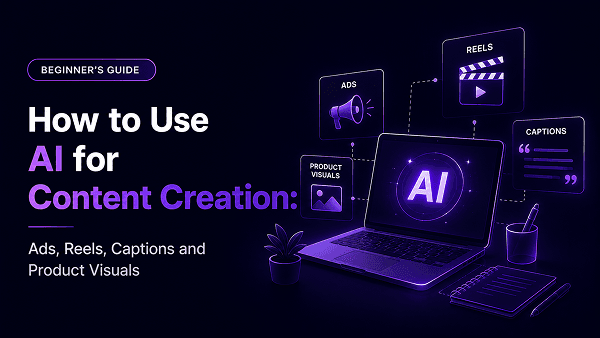
AI has changed the way content is created.
Earlier, one simple campaign needed multiple steps: idea, copywriting, design direction, product visuals, reel scripts, captions, ad angles, and sometimes video concepts.
For students, freelancers, marketers, creators, business owners, and agencies, this process could take a lot of time.
Ready to turn these ideas into practical skills? Explore the complete AI course curriculum.
Quick Answer: How Can AI Be Used for Content Creation?
AI can be used for content creation by helping you generate ideas, write captions, create ad copies, plan reels, build campaign angles, draft scripts, and create product visuals. The best results come when you use AI with a clear brief, structured prompt, output review, and refinement process.
AI should not replace your thinking.
It should support your thinking.
You still need to understand the audience, the product, the offer, the emotion, and the final goal. AI helps you create faster, but your direction decides whether the output becomes useful.
Why Most AI Content Looks Generic
Many people complain that AI content sounds the same.
That usually happens because the prompt is too generic.
For example:
“Write a caption for my product.”
This prompt gives AI almost no context. It does not explain who the audience is, what the product does, what problem it solves, what tone to use, or what action the reader should take.
A better prompt would be:
“Write 5 Instagram captions for a skincare brand targeting working women aged 22–35 who want a simple daily skincare routine. Focus on fresh skin, time-saving, and confidence. Keep the tone warm, premium, and practical. Add a short CTA.”
This prompt gives direction.
Good AI content starts with good input.
If the brief is weak, the output will usually be weak. If the brief is clear, AI can help create stronger ideas, better copy, and more useful creative options.
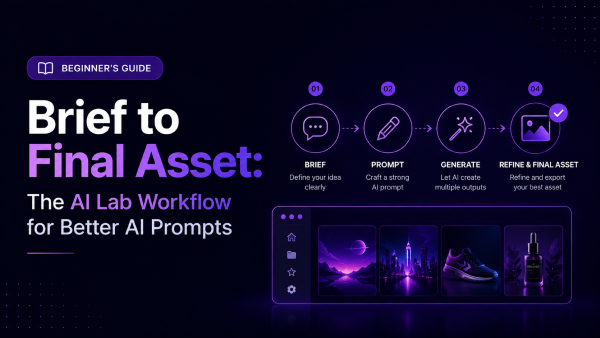
The Content Creation Workflow Beginners Should Follow
Before using any AI tool, follow this simple workflow:
Idea → Brief → Prompt → Output → Edit → Repurpose → Final Asset
This workflow helps you move from random content to controlled content creation.
1. Idea
Every piece of content starts with an idea.
Example:
* “I want to promote an AI course.”
* “I want to create a reel for a product.”
* “I want to write ad copy for a workshop.”
* “I want to create product visuals for Instagram.”
* “I want to make content for business owners.”
The idea can be simple. It does not need to be perfect.
2. Brief
The brief gives the idea direction.
A good brief answers:
* Who is this for?
* What is the problem?
* What is the main message?
* What is the tone?
* Where will this content be used?
* What action should the audience take?
Example:
“This content is for business owners who want to create faster marketing content using AI. The message is that AI can help them create captions, reels, ads, and product visuals without depending on a large team. The tone should be simple, practical, and confident.”
3. Prompt
Now convert the brief into an AI prompt.
Example:
“Act as a content marketer. Create 5 Instagram post ideas for business owners who want to use AI for faster marketing content. Focus on captions, reels, ad copies, and product visuals. Keep the tone practical and easy to understand. Give the output in a table with hook, content angle, and CTA.”
This is stronger than asking AI to “give content ideas.”
4. Output
The first output is only a draft.
Do not publish it immediately.
Check whether the output is relevant, clear, and specific.
Ask:
* Is the hook strong?
* Is the audience clear?
* Is the idea useful?
* Is the tone right?
* Is the CTA clear?
* Does it sound human?
* Does it match the brand?
5. Edit
Editing is where AI content becomes better.
You can ask AI to improve the output, but you should also use your own judgment.
For example:
* “Make the hook stronger.”
* “Make this sound less generic.”
* “Add a practical example.”
* “Make it suitable for Instagram carousel.”
* “Make the language more premium.”
* “Rewrite this for students.”
* “Rewrite this for business owners.”
This step turns AI from a content generator into a creative assistant.
6. Repurpose
One idea can become multiple assets.
For example, one topic like “AI helps businesses create faster content” can become:
* A reel script
* A carousel post
* An Instagram caption
* A LinkedIn post
* An ad copy
* A WhatsApp message
* A product visual prompt
* A short video prompt
* An email subject line
This is where AI becomes powerful for content creators and marketers.
7. Final Asset
The final asset is the polished piece of content you can actually use.
The goal is not to create more content for the sake of volume.
The goal is to create useful, relevant, and audience-focused content faster.
How to Use AI for Captions
Captions are one of the easiest ways to start using AI.
But do not ask AI for captions without giving context.
Use this prompt structure:
Audience + Topic + Emotion + Tone + CTA
Example:
“Write 5 Instagram captions for creators who want to learn AI for content creation. Focus on the frustration of slow content production and the benefit of learning practical AI workflows. Keep the tone sharp, simple, and motivating. Add a clear CTA.”
You can also ask AI to create different versions:
* Educational caption
* Emotional caption
* Direct sales caption
* Storytelling caption
* Short caption
* Premium brand caption
This helps you compare angles before choosing the final one.
How to Use AI for Reels
Reels need more than a caption.
A good reel needs a hook, message, flow, visual idea, and CTA.
Use this prompt:
“Write a 30-second reel script for [audience] about [topic]. Start with a strong hook, explain the problem, give one practical insight, and end with a clear CTA. Add visual direction for each scene.”
Example:
“Write a 30-second reel script for students who want to learn AI but feel confused by too many tools. The message should be that AI learning should focus on workflows, not random tricks. Add visual direction for each scene.”
This gives you a stronger output because AI now understands the structure.
For better results, ask for:
* 3 hook options
* Scene-wise breakdown
* Voiceover script
* On-screen text
* Caption
* CTA
* Thumbnail text
This turns one reel idea into a full content asset.
How to Use AI for Ads
AI can help write ad copies quickly, but ads need sharper thinking.
A good ad should have:
* Audience pain point
* Clear benefit
* Specific offer
* Reason to act
* Simple CTA
Use this prompt:
“Act as a performance marketer. Write 5 short ad copies for [offer] targeting [audience]. Focus on their main pain point, the practical benefit, and a clear CTA. Keep each ad copy under 80 words.”
Example:
“Act as a performance marketer. Write 5 short ad copies for a Practical GenAI Course targeting creators, students, and business owners who want to learn AI for real content creation. Focus on no coding, AI Lab access, ads, reels, product visuals, and output-based learning.”
AI can also help you create different ad angles:
* Problem-solution angle
* Career growth angle
* Business efficiency angle
* Creative speed angle
* Beginner-friendly angle
* No-coding angle
This helps marketers test more ideas before running campaigns.
How to Use AI for Product Visuals
Product visuals are one of the strongest use cases of AI creative tools.
A good product visual prompt should describe:
* Product
* Background
* Lighting
* Camera angle
* Style
* Mood
* Use case
* Platform
Example:
“Create a premium product visual of a skincare bottle on a clean marble surface, soft studio lighting, close-up angle, minimal luxury background, realistic product photography style, suitable for Instagram advertising.”
For a food brand:
“Create a close-up product visual of a gourmet chocolate bar on a dark wooden table, warm lighting, rich premium mood, shallow depth of field, realistic food photography style, suitable for a social media ad.”
For fashion:
“Create a premium visual of a leather handbag on a clean beige studio background, soft shadows, luxury fashion photography style, elegant composition, suitable for Instagram campaign creative.”
The key is to think like a creative director.
Do not only describe the product. Describe the mood, setting, and purpose.
How One Idea Can Become a Full Campaign
AI becomes most useful when you stop creating one piece of content at a time and start building content systems.
Take one idea:
“Learn AI for real work, not random experiments.”
This one idea can become:
A reel hook:
“Stop watching AI tricks. Start building AI workflows.”
A caption:
“AI is useful only when you know how to turn prompts into real output.”
An ad copy:
“Learn practical GenAI with live guidance, AI Lab access, and output-based projects.”
A product visual prompt:
“Create a modern digital classroom scene with students creating AI images and video assets on laptops.”
A carousel post:
“5 reasons random AI prompts do not create professional output.”
A WhatsApp message:
“If AI feels confusing, start with workflows. Learn how prompts, tools, and outputs connect.”
This is how AI content creation becomes efficient.
You turn one idea into many assets across platforms.
Why Prompt Engineering Matters for Content Creation
Prompt engineering is the foundation of good AI content.
Without clear prompts, AI content becomes generic. With structured prompts, AI can create stronger outputs for captions, reels, ads, product visuals, and campaign ideas.
That is why beginners should not only learn tool names. They should learn how to give direction.
A prompt should include:
* Role
* Task
* Audience
* Context
* Tone
* Format
* Goal
If you want to learn this in more detail, read our guide on prompt engineering for beginners.
Prompt engineering helps you move from random output to controlled creation.
Where AI Lab Practice Helps
AI tools for content creation behave differently.
A text tool helps with captions and scripts.
An image engine helps with product visuals.
A video engine helps with reels and motion.
A design tool helps polish the final layout.
Beginners often get confused because they do not know which tool to use for which asset.
That is where AI Lab practice helps.
In the Practical GenAI Course, learners get guided exposure to useful AI tools and workflows for content, images, videos, product visuals, ads, reels, and campaign assets.
The class gives the logic.
The AI Lab gives the practice.
This helps learners understand how to choose tools, write prompts, compare outputs, and refine the final asset.
Who Can Use AI for Content Creation?
AI content creation is useful for different learners.
Students can use it to build portfolio-ready projects and creative samples.
Business owners can use it to create faster marketing content without waiting for every small task.
Creators can use it to generate reel ideas, captions, visual concepts, and content calendars.
Freelancers can use it to offer content, ad copy, creative direction, and AI-assisted visual services.
Agencies can use it to speed up ideation, campaign planning, creative mockups, and client-ready workflows.
This is why AI content creation is not only a trend.
It is becoming a practical work skill.
How a Practical GenAI Course Helps
If you want to use AI seriously for content creation, you need more than prompt examples.
You need to understand workflows.
The Practical GenAI Course helps beginners learn prompt engineering, AI content creation, no-code AI tools, AI image generation, AI video workflows, product visuals, ad creatives, reels, captions, scripts, AI Lab practice, assignments, and a final capstone project.
It is designed for students, business owners, creators, marketers, freelancers, and agency teams who want to use AI for real work.
The course is not about random AI tricks.
It is about building practical AI workflows.
If your goal is to create ads, reels, captions, product visuals, and campaign assets, this is the kind of learning path you need.
Final Thoughts
AI can help you create content faster, but speed alone is not the goal.
The goal is to create better, more relevant, and more useful content with less confusion.
To do that, you need a workflow.
Start with a clear idea.
Turn it into a brief.
Write a structured prompt.
Review the output.
Edit and refine it.
Repurpose it into multiple assets.
Build final content that serves a real goal.
That is how AI becomes useful for content creation.
If you want to start, download the free AI Content Creation Starter Kit with prompts, content ideas, ad templates, reel workflows, and product visual prompts.
And if you want guided learning, AI Lab access, no-code workflows, assignments, and a final project, explore the Practical GenAI Course.
Do not use AI only to create more content.
Use AI to create better content with better workflows.
Start Your AI Journey Today
Join India's #1 Generative AI course and master the future of creative intelligence.